💡 Quick Answer: You can replace your Samsung Smart TV launcher with an ad-free home launcher using Arn0 Launcher (by developer NelsonEU). Designed specifically for Samsung Tizen OS, this open-source custom home screen completely eliminates Smart Hub advertisements, sponsored video trailers, and background telemetry daemons—giving you a clean digital clock, a curated apps row, and direct gaming console inputs running at a locked 60 FPS without root access.
If you have purchased a Samsung Smart TV in recent years, you are intimately familiar with the frustration of turning on your television only to be overwhelmed by a cluttered storefront. What used to be a discrete, responsive pop-up bar along the bottom of the screen has been replaced by a full-screen Smart Hub interface dominated by auto-playing video trailers, unskippable sponsored rows, promoted live TV channels, and retail banners.
Beyond the visual clutter, the modern Tizen home screen introduces severe performance bottlenecks. Most consumer smart TVs operate on modest quad-core processors with 1.5 GB to 2 GB of RAM. When the operating system is forced to juggle heavy advertising frameworks, video recommendation carousels, and persistent telemetry daemons, navigating menus turns into a stuttering, laggy ordeal where remote button presses are delayed or dropped entirely. Just as Android TV users turn to debloating tools to disable background trackers or speed up sluggish smart TV performance, Samsung owners have been searching for a way to replace the default Samsung Smart TV launcher with a truly ad-free home launcher.

To take back control of his own living room television—a Samsung Q70B running Tizen 6.5—developer NelsonEU created Arn0 Launcher (hosted publicly on GitHub under the MIT license). While Android TV and Google TV users often rely on custom launchers like Projectivy, Samsung’s proprietary Tizen OS has traditionally locked users into the factory interface. Arn0 breaks that barrier, engineered around one core principle: a clock, a row of your apps, a row of your consoles, and nothing else.
“Live gradient layers behind the UI measured 4.6 fps, 178.7 ms median, 88 of 90 frames dropped. Baking readability scrims directly into the wallpaper JPEGs at build time is what allows the TV to maintain a locked 60 fps.”
— NelsonEU, Arn0 TV Architectural Notes
In this technical deep dive and installation guide, we will examine the architectural breakthroughs behind Arn0 Launcher, how its rendering pipeline was measured and optimized for embedded TV hardware, how you can test it on your computer without touching a TV, and how developer mode allows you to safely install it and even remap the remote’s physical Home button without rooting your television.
The Problem: How Samsung Smart Hub Became an Ad Billboard
Prior to 2022, Samsung’s Tizen OS was praised for its minimalist “Eden” launcher—a clean horizontal overlay that appeared over your active HDMI source or video stream without interrupting your viewing experience. However, starting with Tizen 6.5 and expanding through Tizen 7, 8, and 9 on modern displays (from budget Crystal UHD models to premium panels detailed in our QLED vs OLED comparison guide), Samsung replaced this overlay with a mandatory full-screen experience known internally as com.samsung.tv.csfs.

This design overhaul was not engineered for user convenience; it was built for recurring monetization. Every cold boot and press of the remote’s Home button forces your television to connect to external ad networks, fetch promotional banners, spin up preview video streams, and execute telemetry scripts that record what you watch and how long you browse.
The technical cost of this architecture is immense:
- RAM Depletion: The background advertising services and multi-layered web views consume over 600 MB of system memory, starving active streaming apps and video decoders.
- Frame Drops and Navigation Lag: Sweeping across the stock home screen frequently drops frame rates into the single digits, causing noticeable remote input delay.
- Unwanted Auto-Play Audio: Sponsored previews often trigger background audio tracks while you are merely attempting to select an HDMI input.
- Forced Promotion of Samsung Services: Tiles for Samsung TV Plus, gaming subscriptions, and retail recommendations take priority over the apps and consoles you actually own.
What is Arn0 Launcher? Inside the Minimalist Dashboard
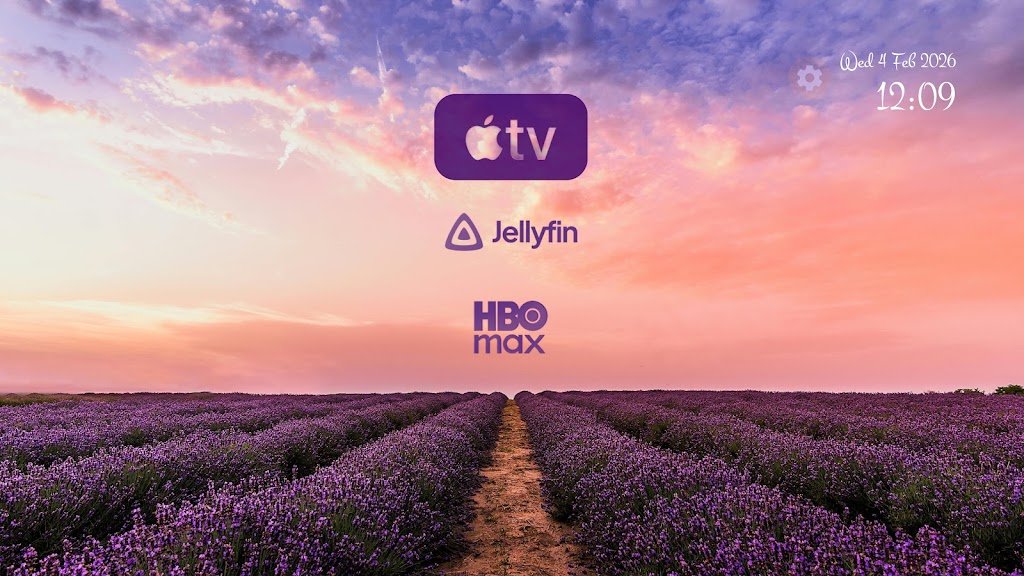
Arn0 Launcher strips away every layer of commercial intrusion. It provides an immediate, clutter-free staging environment optimized strictly for your remote control.

Key architectural components include:
- The Top Bar: Displays the current time and date rendered in clean typography. A simple tap Up on the directional pad highlights the gear icon to enter Settings.
- The Apps Row: A customizable list of your installed streaming applications (such as Netflix, YouTube, Plex, Prime Video, Disney+, Apple TV, Crunchyroll, and Spotify). Selecting an app invokes Samsung’s native
tizen.application.launch()API. - The Consoles & Inputs Row: Direct switcher tiles for your physical HDMI ports (e.g., PlayStation 5 on HDMI 1, Xbox Series X on HDMI 2, Nintendo Switch on HDMI 3). Selecting a tile switches the video plane immediately via
tizen.tvwindowandtizen.systeminfowithout browsing complex input menus. - Ambient Screensaver: When left idle, Arn0 smoothly transitions into an ambient photo screensaver featuring slow Ken Burns camera pans, live local weather updates fetched through Open-Meteo, and zero network tracking. Similar to our guide on customizing smart TV lockscreens and screensavers, Arn0 lets you load your own personal photography into the rotation.
- Built-in Sound Engine: Lightweight Web Audio feedback provides subtle acoustic clicks on remote navigation, making the TV feel tactile and responsive.
- Hidden Retro Runner Game: An embedded Easter egg mini-game activated right from the home screen by pressing Left and Right alternately three times (◀ ▶ ◀ ▶ ◀ ▶). Up/OK jumps, Down ducks, and Back returns home.
Hardware Benchmarking: How Arn0 Achieves Locked 60 FPS
Most web-based TV apps feel slow because developers write modern desktop CSS without profiling how low-power television silicon actually renders graphics. NelsonEU took a scientific, measurement-driven approach using an embedded Lab render probe on reference hardware (Samsung Q70B, Chromium 85 web engine, 4 CPU cores, 2 GB RAM).
The benchmarking revealed crucial engineering discoveries:
| CSS / Architectural Technique | Measured Performance on TV | Real-World Hardware Impact |
|---|---|---|
Blurred Box Shadows (8 tiles at 0 40px 100px) | 59.5 FPS (16.8 ms median frame) | Virtually Free. Zero dropped frames across focus sweeps. Shadows leverage hardware texture caching efficiently. |
| Live Runtime Radial Gradients (3x 1100px layers) | 4.6 FPS (178.7 ms median frame) | Completely Ruinous. 88 out of 90 frames dropped! The TV GPU cannot composite dynamic vector gradients in real time. |
| Baked Scrim Wallpapers (Pre-rendered JPEGs) | 60.0 FPS (16.6 ms median frame) | Optimal Solution. Dark gradient scrims are pre-burned into 1080p background images at build time via Node.js scripts. |
| Bundled Offline Fonts (Manrope, Inter, Outfit, DM Sans) | Instantaneous Render | Zero network latency, no Flash of Unstyled Text (FOUT), and total offline independence. |
Additionally, the code avoids unsupported modern CSS that causes silent rendering stalls in Chromium 85—such as inset, aspect-ratio, overflow: clip, color-mix(), container queries, and :has()—while relying reliably on hardware-accelerated transforms, CSS Grid, and clamp().
Samsung Smart Hub vs. Arn0 Launcher Comparison
To understand the difference in everyday usability, here is how the default Tizen experience compares directly with Arn0 Launcher:
| Feature / Metric | Stock Samsung Smart Hub | Arn0 Custom Launcher |
|---|---|---|
| Advertisements & Banners | Aggressive (banners, sponsored rows, video trailers) | Zero. Completely ad-free. |
| Navigation Frame Rate | Variable (frequent drops to 10–25 FPS) | Locked 59.5 – 60 FPS |
| Memory Consumption | Over 600 MB active background RAM | Under 45 MB total footprint |
| Network Telemetry | Continuous outbound tracking to Samsung & ad partners | Zero analytics, 100% offline operational |
| Input Switching | Buried deep inside multi-click side menus | Dedicated tiles for connected consoles/ports |
| Remote Control Customization | Locked down to factory presets | Remappable color keys (R, G, Y, B) & shortcuts |
| Installation Requirements | Factory default | Standard Developer Mode (UID 901, No root) |
| System Reversibility | N/A | 100% Reversible via baseline restore or uninstall |
Try the Interface in Your Browser (No TV Required)
One of the most impressive features of Arn0 Launcher is its built-in development simulation. You do not need to connect to a TV to see how it looks and responds. The repository includes src/js/tizen-mock.js, which mocks all Tizen system APIs in a standard browser window.
To preview the interface on your PC or Mac, ensure you have Node.js 20 or newer installed, then run:
# Clone the Arn0 repository
git clone https://github.com/NelsonEU/arn0-tv.git
cd arn0-tv

# Start the local browser preview server
npm run preview
Open http://localhost:8080 in your browser. You can navigate the launcher using standard keyboard keys that mirror your physical TV remote:
- Arrow Keys: Move focus along tiles and rows. Pressing Up from the apps row selects Settings.
- Enter: Select / launch application / switch HDMI input.
- Escape or Backspace: Back button (returns to Home).
- Keys R, G, Y, B: Triggers the remote’s Red, Green, Yellow, and Blue color shortcuts (Red = All Apps, Green = Next Wallpaper, Blue = Lab diagnostic screen).
Customizing Your Tiles and Consoles
Everything in src/js/config.js is meant to be edited. You can configure which apps appear, your gaming consoles, HDMI port mappings, starting wallpaper, and typography. To keep your personalized settings separate from git tracking, copy src/js/config.local.example.js to src/js/config.local.js. This local file is automatically merged over the defaults during both browser preview and package compilation.
Part 1: Installing Arn0 on Your Samsung TV as a Web App
Installing Arn0 Launcher as an application is completely safe and 100% reversible by simply uninstalling it from your TV menu. In this mode, Arn0 lives in your normal app list; you can open it anytime you want a quiet, ad-free dashboard.
Step 1: Enable Developer Mode on Your Samsung TV
- Turn on your Samsung TV and open the Apps screen.
- Using the physical remote control, press the number sequence 1, 2, 3, 4, 5.
- A Developer Mode configuration popup will appear on screen. Toggle Developer Mode to On.
- Enter the local IP address of your computer (the machine running on the same Wi-Fi or Ethernet network).
- Hold down the remote’s Power button for 5 seconds until the Samsung logo appears to reboot the TV and apply Developer Mode.
Step 2: Build the Tizen Package (.wgt)
Inside your terminal in the arn0-tv folder, run the build command:
npm run buildThis generates the compiled web package at dist/arn0-launcher.wgt containing all assets, bundled fonts, recolored brand SVGs, and pre-baked 1080p wallpapers.
Step 3: Deploy the Package to Your TV
You can deploy arn0-launcher.wgt using either of two methods:
- Method A (GUI): Apps2Samsung: Use the free community tool Apps2Samsung. Connect to your TV’s IP, select the Custom WGT File option, point to
dist/arn0-launcher.wgt, sign with your Samsung certificate, and click Install. - Method B (CLI): Tizen Studio SDK: If you have the official Tizen CLI installed, connect via Smart Development Bridge (SDB) and install directly:
sdb connect <YOUR_TV_IP>
tizen install -n arn0-launcher.wgt -t <YOUR_DEVICE_ID>
Once installed, launch Arn0 Launcher from your app row. Test launching your streaming apps and switching HDMI inputs. If you are satisfied with launching it manually, you can stop here. Your TV’s core factory firmware remains entirely untouched.
Part 2: Remapping the Physical Home Button (Advanced)
Samsung does not offer an official consumer setting to reassign what the remote’s physical Home button opens. By default, it hard-targets com.samsung.tv.csfs (Smart Hub). However, NelsonEU engineered an ingenious native solution utilizing platform C APIs through developer privilege UID 901.
How the Native Integration Works
Inside the repository’s native/ directory reside two small, focused C# / .NET assemblies:
Query.cs(Arn0HomeQuery): A strictly read-only assembly that queries and prints current system preferences. It contains no write calls whatsoever.Control.cs(Arn0HomeControl): Accepts commands (query,verify,apply, orrestore). When executed withapply, it calls Tizen’s platform librarylibcapi-appfw-app-operation-tv.so.0andlibvconf.so.0:app_operation_set_current_app("http://tizen.org/appcontrol/operation/main", "Arn0Lnchr0.Launcher"); vconf_set_str("db/appfw/home_appid", "Arn0Lnchr0.Launcher");
Built-in Safety Architecture
To eliminate bricking risks, the native helpers enforce three non-negotiable safety gates before reading or modifying any system state:
- 32-Bit Architecture Check: Confirms the process is running in 32-bit armv7 space.
- UID 901 Enforcement: Ensures execution occurs under standard Developer Mode (UID 901), preventing unsafe root escalations.
- Firmware String Validation: Inspects
/etc/prd_info.inito confirm matching firmware signatures before touching any registry keys. - Automated Baseline Backup: Before any modification, current settings are serialized to a JSON baseline file. If anything fails, or if you ever wish to return to factory Smart Hub, running the helper with
restoreimmediately reverts all values.
⚠️ Important Compatibility Notice: The native Home-button helper was tested and validated on a Samsung QE65Q70B (2022) running firmware T-PTMDEUC-1720.7 (Tizen 6.5, armv7). Because internal preference keys can differ across regions and major OS generations (such as Tizen 7, 8, or The Frame series), do not bypass or disable the safety checks on untested hardware.
Does installing Arn0 Launcher void my Samsung warranty?
No. Installing web applications via Developer Mode (UID 901) uses standard Samsung-supported developer tools. It does not flash unauthorized firmware, trip hardware security fuses (like Knox on phones), or void consumer warranties. You can uninstall the package from the standard TV menu at any time.
Will Netflix, Prime Video, and 4K HDR playback still work?
Yes, perfectly. Arn0 Launcher does not modify video playback pipelines or Widevine / PlayReady DRM security keys. It simply invokes native streaming apps via tizen.application.launch(). All streaming services continue to play in full 4K, HDR10+, and Dolby Atmos exactly as they did before.
What happens when Samsung releases a firmware update?
Major firmware updates may reset undocumented preference keys (like db/appfw/home_appid) back to stock factory defaults. If that occurs, the launcher remains installed in your app row, and you can re-run the native helper to re-bind the Home button in under one minute.
Can I use Arn0 Launcher on Android TV or Google TV?
No. Arn0 Launcher is built specifically for Samsung’s proprietary Tizen OS. If you own an Android TV or Google TV (such as Sony, TCL, Xiaomi, or Google TV Streamer), use dedicated Android launchers like Projectivy Launcher or debloating tools like Tellyscope instead.
Final Verdict: Taking Back Control of Your Television
Smart TVs have become the most intrusive screens in our households, quietly monetizing our attention through unsolicited advertising and bloated background software. Developer NelsonEU’s Arn0 Launcher demonstrates the power of thoughtful, open-source platform engineering: proving that with proper hardware profiling and a focus on minimalism, your living room TV can once again be responsive, beautiful, and peaceful.
Whether you choose to run Arn0 as a standalone dashboard app or go all-in by remapping your Home button, it represents the cleanest, most satisfying upgrade available to replace the default Samsung Smart TV launcher with an ad-free home launcher today.