Direct Answer: You can debloat any Android TV or Google TV over Wi-Fi without a PC or root using open-source tools like Tellyscope (an Android phone app) or CleanYourTV (a WebADB browser tool). Both use safe pm disable-user commands to freeze pre-installed bloatware, halt telemetry daemons, and block ad banners without voiding warranties or breaking 4K DRM playback.
Turn on almost any modern smart TV today, whether it is a Sony Bravia, TCL, Xiaomi, Hisense, Onn 4K, or a Google TV Streamer, and you are greeted by an aggressive wall of advertisements. Full-screen auto-playing video trailers, unskippable sponsored rows, promoted movie suggestions, and background analytics services have turned our living room screens into laggy, cluttered billboards.
Because most smart TVs and streaming sticks come with modest processors and limited RAM (often just 1.5 GB or 2 GB), these background advertising engines leave less than 300 MB of free memory. The result is sluggish navigation, delayed remote clicks, app crashes, and constant frustration.

Fortunately, an open-source community movement has solved this exact problem. First came CleanYourTV, a viral project created by developer Gathin that garnered over 7.4 million views by allowing users to strip ads and bloatware over Wi-Fi. Building on that foundation, developer Manish created Tellyscope, a completely free, open-source Android phone app that lets anyone clean up, debloat, sideload, and speed up their Android TV in five minutes directly from their smartphone, with no computer, no cables, and no root access required.
In this beginner-friendly guide, we will break down everything you need to know. We will explore how Tellyscope works, guide you through cleaning your TV step-by-step from your phone, explain the original CleanYourTV PC/Web method, address crucial safety questions, and help you transform your slow TV into a lightning-fast entertainment center.
Why Is Your Smart TV So Slow? The Reality of TV Bloatware
Smart TV hardware prices have dropped dramatically over the past decade. Manufacturers and streaming platforms subsidize cheaper hardware by monetizing your home screen through targeted advertisements, sponsored recommendation rows, and telemetry trackers running silently in the background.
Here is what happens behind the scenes every time you turn on your TV:
- Stock Launchers Load Heavy Video Assets: Google TV and Android TV home screens constantly pull high-resolution promotional artwork and auto-playing trailers, hogging bandwidth and processing power.
- Telemetry & Analytics Daemon Services: TV makers (like Xiaomi, TCL, Sony, and Amazon) preload background system packages that monitor viewing patterns, usage metrics, and device diagnostics.
- Unwanted Pre-installed Apps: Many TVs come preloaded with regional streaming apps, demo channels, or games that you never asked for and cannot uninstall through standard TV settings.
- RAM Bottlenecks: With multiple background tracking daemons running simultaneously, your TV is left with minimal free memory, resulting in sluggish remote responses and stuttering menus.
The Open-Source Fix: How ADB Over Wi-Fi Changes Everything
Every Android-based TV contains a built-in diagnostic gateway known as Android Debug Bridge (ADB). Developers use ADB to test software, but smart TV enthusiasts use it to send standard system commands over local Wi-Fi.
The key command is pm disable-user. Instead of permanently deleting a system file (which could void warranties or brick a device), this command tells Android to freeze the app for the primary user. The app stops loading, consumes zero RAM, sends zero data, and vanishes from your home screen. However, it remains securely in storage so you can re-enable it in a single click whenever you wish.
Historically, running ADB commands required connecting a laptop, installing command-line tools, and typing complex package names. Tellyscope and CleanYourTV have completely automated this process, making it accessible to anyone who can tap a smartphone screen.
Meet Tellyscope: The Under-3MB Phone App That Debloats Over Wi-Fi
Tellyscope (developed by Manish / man15h on GitHub) is an open-source Android app designed from the ground up for privacy, simplicity, and safety. Rather than demanding a computer or terminal, it packages an entire ADB engine inside a clean, lightweight phone interface.

Key Features of Tellyscope:
- Under 3 MB & Zero Tracking: Free and licensed under GPL-3.0. There are no advertisements, no tracking telemetry, and no account creation required. The app only makes two internet requests: syncing curated debloat lists from GitHub and an optional version check.
- Automated Model-Specific Debloat Lists: Tellyscope syncs daily with the CleanYourTV repository. When it detects your TV model, it automatically highlights the exact bloatware packages known to be safe to disable for your specific brand.
- 100% Reversible with Instant Undo: Factory-installed apps are only disabled, never permanently wiped. The app maintains a full change history, and a dedicated “Restore everything” button turns back on all disabled packages in seconds.
- Protected System Guard: Essential system apps (such as Wi-Fi managers, Bluetooth services, audio drivers, input methods, and the core operating system) are locked in an un-editable “System” section to prevent accidental misconfigurations.
- One-Tap Private DNS Ad Blocking: On TVs running Android 9 or newer, Tellyscope allows you to toggle an ad-blocking Private DNS server directly on the TV, blocking sponsored banners at the domain level.
- Effortless Sideloading: If your TV store lacks certain apps (for instance, Netflix on certified projectors, SmartTube, or specialized media players), you can send and install APK files directly from your phone’s downloads folder.
- Wireless File Transfers: Send movies, subtitles, family photos, or wallpapers from your phone straight to the TV’s Movies or Downloads folder without flash drives.
- Built-In Touch Remote & Keyboard: Includes a responsive D-pad remote with volume controls and allows you to type long passwords or search queries into your TV using your phone’s full virtual keyboard.
Step-by-Step Walkthrough: How to Clean Your TV Using Tellyscope (Phone Method)
Ready to speed up your TV? Follow this 5-minute guide. You will need your Android smartphone and your TV connected to the same Wi-Fi network.
Step 1: Download and Install Tellyscope on Your Phone
Because Tellyscope is an independent open-source utility that controls ADB, it is distributed directly through trusted open-source repositories:
- GitHub Releases: Visit the official Tellyscope GitHub Releases page on your phone, download the latest
Tellyscope.apk, and tap install. - Obtainium: If you use Obtainium to track open-source apps, add the GitHub URL (
https://github.com/man15h/tellyscope) to receive automated background updates. - Orion Store: Tellyscope is also available directly in the open-source Orion Store catalog.
Step 2: Enable Developer Options & USB Debugging on Your TV
To let Tellyscope communicate with your TV over Wi-Fi, you must enable Android’s built-in developer mode. This takes less than 30 seconds:
- On your TV remote, open Settings (the gear icon).
- Navigate to System (or Device Preferences) > About.
- Scroll down to Android TV OS build (or Build).
- Click the OK button on your remote 7 times in rapid succession. A pop-up notification will appear saying: “You are now a developer!”
- Press Back and open the newly unlocked Developer options menu.
- Toggle USB debugging to ON. If your TV shows a toggle for Network debugging or Wireless debugging, turn that ON as well.
Step 3: Connect Tellyscope to Your TV Over Wi-Fi
Open Tellyscope on your phone. The app will automatically scan your local Wi-Fi for available Android TV devices.
- Automatic Pairing: Select your TV from the scan list. A prompt will immediately appear on your TV screen asking: “Allow USB debugging?”
- Check the box that says “Always allow from this computer/phone” and click Allow on your TV remote.
- Manual IP Connection: If your TV does not appear in the scan, tap + Device, find your TV’s IP address in TV Settings > Network & Internet, enter it into Tellyscope, and hit connect.
Step 4: Review and Run the Debloat Checklist

Once connected, tap the Debloat tab. Tellyscope identifies your TV’s exact hardware brand and presents a pre-sorted checklist adapted from the CleanYourTV database:
- Pre-checked Safe Items: Ad recommendation services, retail demo apps, promotional screensavers, and brand telemetry daemons.
- Optional Items: Secondary launchers, regional live channels, or manufacturer-specific app stores. You can uncheck anything you actively use.
- Tap Apply Debloat. Tellyscope displays a final summary confirmation. Hit confirm, and watch the app disable each package in real-time within seconds.
Step 5: Apply TV Tweaks for Speed and Ad Blocking

Head over to the Tweaks section inside Tellyscope to unlock further performance gains:
- Block Ads (Private DNS): Toggle this on (requires Android 9+). It configures your TV to route DNS queries through an ad-filtering resolver, halting background ad banners and telemetry pings across streaming services.
- Speed Up Animations: Cuts Android window transition scales from 1.0x to 0.5x, making UI navigation and app opening feel twice as snappy.
- Clear App Caches: Flushes residual cache junk from memory with one tap to immediately free up internal storage.

The Power-User Alternative: CleanYourTV (PC, Mac & Web Method)
While Tellyscope is the easiest route for Android phone owners, it owes its foundation to CleanYourTV by developer Gathin (Gathin23/cleanyourtv). CleanYourTV is the viral phenomenon that pioneered automated TV debloating, gathering contributions for over 316 TV models across 89 brands.

CleanYourTV is ideal if you prefer using your PC/Mac or if you want CleanYourTV’s custom Apple TV-style minimalist launcher.
How CleanYourTV Works:
- Browser-Based WebADB: Through the official web portal at cleanyour.tv, you can connect your computer (Chrome or Edge) to your TV via WebADB without installing any local developer software.
- AI Coding Assistant Workflow: If you use terminal AI agents like Claude Code, Codex, or Gemini CLI, CleanYourTV includes an intelligent
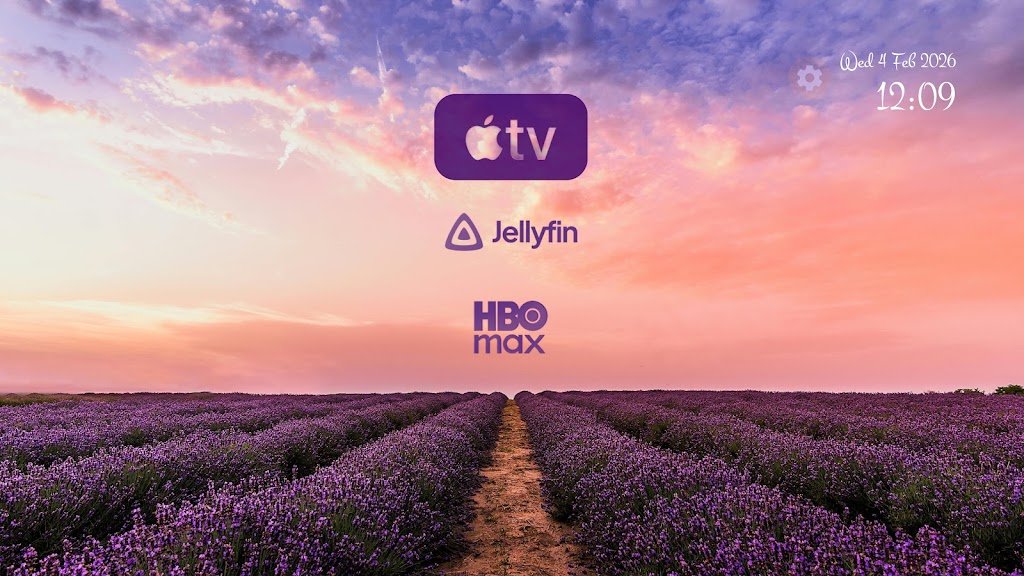
PROMPT.md. You simply run the prompt, specify your TV brand, and your AI assistant discovers your TV over Wi-Fi, creates a safe backup, disables bloatware, and verifies results via live screenshots. - The Signature Apple TV-Style Launcher: Unlike standard third-party launchers, CleanYourTV includes an ultra-lightweight (under 523 KB) home screen replacement designed in Google’s Outfit typography. It delivers a pitch-black background, a 4-app bottom dock, subtle ambient color glows derived from focused app artwork, and floating glass highlights.

Comparison: Tellyscope vs. CleanYourTV vs. Manual ADB
Not sure which solution matches your setup? Here is how the three approaches compare:
| Feature | Tellyscope App | CleanYourTV Project | Manual ADB Terminal |
|---|---|---|---|
| Required Device | Android Smartphone only | Computer (PC/Mac/Linux) | Computer with ADB Tools |
| Cables Needed | None (Wi-Fi ADB) | None (Wi-Fi WebADB) | None (Wi-Fi) or USB |
| Difficulty Level | Beginner (5 Mins) | Intermediate (10 Mins) | Advanced (Manual commands) |
| Custom Minimal Launcher | Supports external (Projectivy Launcher) | Includes custom 523KB Apple-style UI | Must install manually |
| Sideloading & File Send | Yes, directly from phone | Via terminal / Web tool | Manual adb push / install |
| Touch Remote & Typing | Yes, built-in D-pad | No | No |
| Safety & 1-Tap Undo | Yes (Restore Everything button) | Yes (Automated restore script) | Manual package re-enabling |
| Price & License | 100% Free (GPL-3.0) | 100% Free (MIT) | Free (AOSP) |
Device Compatibility: Which TVs Are Supported?
Both Tellyscope and CleanYourTV work on any television or streaming stick powered by Android:
- Google TV & Android TV Devices: Fully supported (both debloating and launcher replacement). Tested across Sony Bravia, TCL, Xiaomi, Hisense, Philips, Onn 4K / Onn 4K Pro, Chromecast with Google TV, Google TV Streamer 4K, NVIDIA Shield TV, OnePlus TV, and hundreds of regional models.
- Smart Projectors: XGIMI, Anker Nebula, Formovie, JMGO, BYINTEK, and BenQ projectors running Android TV.
- Amazon Fire TV (Fire OS): Supported for debloating only. Because Amazon intentionally restricts third-party launchers on newer Fire OS firmware, you can disable bloatware and trackers, but the stock home screen cannot be replaced without custom accessibility overrides.
- Samsung (Tizen) & LG (webOS): Not supported. Samsung and LG run proprietary Unix-like operating systems that do not use the Android framework or ADB. For LG TVs, explore third-party homebrew communities like WebOSBrew instead.
- Vizio (SmartCast): Not supported, as Vizio runs its own closed, locked firmware without ADB connectivity.
Frequently Asked Questions & Safety Guidelines
Will debloating void my TV warranty or prevent software updates?
No. Debloating via ADB does not unlock the bootloader or root your device. You are simply utilizing standard Android configuration flags. Official over-the-air (OTA) system updates continue to work normally, and your manufacturer warranty remains completely intact.
Will I lose 4K streaming, HDR, Dolby Vision, or Netflix certification?
No. Hardware DRM keys (such as Google Widevine L1) and Dolby certifications are tied to device firmware signatures. Because Tellyscope and CleanYourTV do not modify system partitions, all official DRM licenses, 4K streaming quality, and Dolby Vision / Atmos capabilities remain completely untouched.
Can debloating accidentally brick my TV?
No. Tellyscope enforces a strict Protected System Guard. Critical operating system daemons (including boot files, Wi-Fi drivers, Bluetooth controllers, and recovery services) are locked so they cannot be touched. Furthermore, because packages are only disabled for the current user (pm disable-user), even in the worst-case scenario where an essential app is toggled off, performing a standard TV factory reset restores every stock file instantly.
What should I do if my exact TV model is not listed?
If your specific model number is not yet indexed, Tellyscope automatically falls back to safe brand-level lists (for example, applying the general Sony or TCL verified rules). You can also inspect any package manually, or check community contributions in the CleanYourTV GitHub repository.
Is there an iPhone (iOS) version of Tellyscope?
Currently, Tellyscope is available exclusively for Android smartphones because iOS restricts local socket connections and does not allow apps to bundle an ADB client. If you only own an iPhone, you can use the web-based version of CleanYourTV on your PC, Mac, or Chromebook via Chrome or Edge.
Final Thoughts: Reclaim Your Living Room Screen
For years, consumers have accepted that modern smart TVs must come burdened with invasive ads, sluggish navigation, and forced promotional content. Thanks to open-source developers like Gathin and Manish, taking back control of your TV no longer requires technical wizardry, dangerous rooting, or complex terminal setups.
With Tellyscope, you can clean your TV in five minutes directly from your smartphone, reclaim valuable system memory, and enjoy a clean, responsive, ad-free streaming experience. Download Tellyscope today, try the CleanYourTV ecosystem, and give your smart TV the performance boost it deserves.
Helpful Project Links:
• Tellyscope GitHub: github.com/man15h/tellyscope
• CleanYourTV GitHub: github.com/Gathin23/cleanyourtv
• CleanYourTV Web Portal: cleanyour.tv