💡 Quick Answer: You can jailbreak and unlock the heavily restricted Jio Set-Top Box (JMSB200A) by emulating a local TR-069 Auto Configuration Server (ACS) to silently enable Wireless ADB on port 5555. Using the community-refined safe “Stage 1” exploit, you can bypass locked settings, permanently freeze unskippable boot advertisements, block forced carrier firmware updates, and sideload custom launchers like Projectivy—all without unlocking the bootloader, voiding Widevine L1 DRM, or risking a permanent hardware brick.
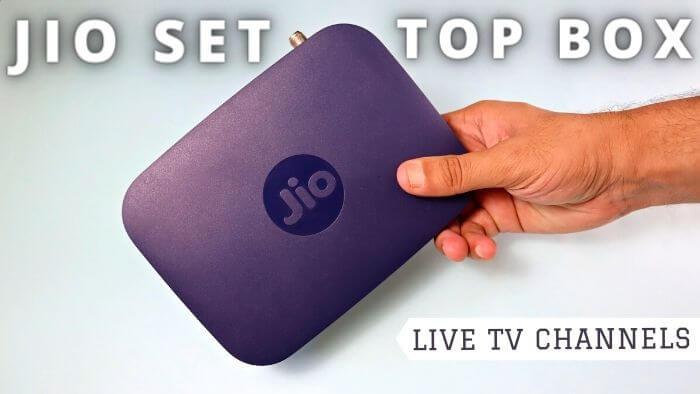
For millions of households across India subscribed to JioFiber and JioAirFiber, the bundled Jio Set-Top Box (STB) is the primary gateway to television entertainment. Powered by capable Amlogic quad-core silicon with 4K HDR playback and native Android TV capabilities, the hardware itself is solid. However, the software experience has long been a source of extreme user frustration.
Every time you power on the television, you are subjected to unskippable full-screen startup video ads. The home screen is overloaded with carrier carousels, sponsored content, and background telemetry daemons that strain the modest 1.5 GB or 2 GB of system RAM. Standard Android developer settings are locked down, the native Package Installer GUI is disabled, and sideloading open-source media utilities like SmartTube, Kodi, or custom launchers has historically been impossible.

That walled garden has officially been dismantled. Following foundational vulnerability research by the JFC-Group and a refined, safety-first public walkthrough by Reddit community member u/ilikechocopies on r/IndiaTech, users can now safely gain Wireless Android Debug Bridge (ADB) access. Just as smart TV enthusiasts use Android TV debloating tools and Projectivy Launcher to clean up sluggish displays, you can now liberate your Jio STB cleanly and reversibly.
⚠️ Legal, Fair Use & Ethical Research Disclaimer:
This guide is published strictly for educational, security research, and interoperability purposes under the principles of Fair Dealing (specifically Section 52(1)(aa) of the Indian Copyright Act, 1957, which protects reverse engineering and observation of computer software for interoperability) and global Right-to-Repair standards.
• Hardware Ownership: Customer Premises Equipment (CPE) provided under rental or security deposit terms remains subject to your operator agreement. Modifying device software may breach your subscriber Terms of Service.
• No Piracy or DRM Circumvention: This process does not crack Widevine L1 encryption, does not bypass content paywalls, and does not provide free access to paid subscription tiers. It strictly activates local ADB debugging and userland app installation.
• Proceed Responsibly: The authors and community researchers bear no liability for device bricking, ISP service interruptions, or hardware replacement fees. Follow all safety recommendations carefully.
Community Credits & Attribution
Responsible disclosure and community attribution are paramount in open-source research. This achievement rests on two key contributions:
- Original Exploit Discovery & PoC: Credit goes to JFC-Group for creating and open-sourcing the Housekeeping-PoC repository (tagged “Sweeping in the cracks”). Their proof-of-concept demonstrated how the carrier TR-069 provisioning loop and Android CVE-2024-31317 vulnerabilities could be triggered to bypass administrative barriers.
- Safe Stage-1 Adaptation & Community Guide: Credit goes to Reddit user u/ilikechocopies on r/IndiaTech, who tested the exploit on retail units, isolated the safe non-destructive stages into the sideload-jiostb repository, and authored the step-by-step tutorial for consumer hardware.
The Underlying Vulnerability: How TR-069 ACS Spoofing Works
To understand why this exploit is so effective—and remarkably safe—we must examine how telecom operators manage subscriber equipment in the field.
Internet Service Providers deploy millions of routers and set-top boxes using an industry-standard protocol called TR-069 (CWMP — CPE WAN Management Protocol). TR-069 allows the operator’s central Auto Configuration Server (ACS) to remotely configure devices, push software updates, run diagnostics, and enable technician debugging tools without dispatching field staff to your home.

Whenever a Jio Set-Top Box powers on or establishes an active network connection, its internal management client initiates an outbound connection query to Jio’s official ACS server:
acs.oss.j.com
Here is the four-step sequence that the exploit takes advantage of:
- Local DNS Interception: By pointing the STB’s DNS resolver to your computer or configuring a local router/hotspot override, any request for
acs.oss.j.comresolves to your local PC rather than Jio’s cloud. - Mock ACS Listener: A local Python script (or an open-source GenieACS instance) listens on the target port, presents the necessary certificate exchange, and accepts the STB’s initial CWMP
Informpacket. - Parameter Injection: The mock server replies with a standard CWMP
SetParameterValuescommand instructing the STB to modify its internal vendor tree:Device.JSTB.USB.USBDebugging→ set totrueDevice.JSTB.FOTA.Disable→ set totrue(blocking automatic remote updates)
- Silent ADB Daemon Launch: Because the instruction appears to come from an authoritative management server, the STB’s operating system applies the values and silently spins up the Android debugging daemon (
adbd) on standard network port 5555.
Why the “Safe Stage 1” Route Is Crucial (And Why Rooting Is a Mistake)
The original research repository included deeper routines aimed at bootloader unlocking and arbitrary kernel flashing. However, on consumer set-top boxes, unlocking the bootloader is a trap that you should actively avoid for two critical reasons:
- High Risk of Hard Bricking: Amlogic SoCs used in carrier equipment feature signed boot partitions. Modifying bootloader variables without manufacturer crypto keys frequently leads to unrecoverable boot loops and permanent device failure.
- Destruction of Widevine L1 DRM: Unlocking the bootloader trips hardware security fuses in the Trusted Execution Environment (TEE). Once tripped, your Widevine L1 DRM keys are destroyed forever. Streaming services like Netflix, Amazon Prime Video, Disney+ Hotstar, and JioCinema will immediately degrade to blurry 480p SD or refuse to launch entirely.
By contrast, the Safe Stage 1 method curated by u/ilikechocopies confines all activity to the userland configuration layer:
“Stage 1 does not overwrite system partitions or touch the bootloader. You gain 100% of the practical benefits—wireless ADB, third-party APK sideloading, startup ad removal, and custom launchers—while keeping 4K Widevine L1 streaming and official live TV intact. If you ever need to revert, a 2-minute factory reset restores pristine stock firmware.”
— Community Security Consensus
Hardware & Software Compatibility
Before proceeding, verify that your device and environment match the tested prerequisites:
| Component | Supported / Tested Specifications | Notes |
|---|---|---|
| STB Hardware Model | Jio STB JMSB200A / JMSD200A variants | Standard rectangular black STB provided with JioFiber/AirFiber |
| Firmware Build | Build 25.1.9 and adjacent Android 9 / 11 branches | Tested on official production builds |
| Host Computer | Windows (via PowerShell/WSL), Linux (Ubuntu/Debian), or macOS | Must have Python 3.9+ and Android Platform Tools (ADB) installed |
| Network Setup | Shared Wi-Fi router OR PC Virtual Hotspot | Both PC and STB must communicate on the same local subnet |
| Required Software | Git, Python 3, OpenSSL, Android Platform Tools | All available via free, open-source package managers |
Step-by-Step Tutorial: Unlocking Wireless ADB on Jio STB
Follow these steps sequentially to set up your environment, trigger the TR-069 parameter change, and gain control of your device.
Step 1: Prepare Your Computer Environment
First, ensure you have Python 3 and the Android Debug Bridge tools installed on your PC:
- Windows: Install Android Platform Tools and add the folder to your System PATH. Install Python 3 from the official site.
- Linux / macOS: Install tools via your terminal:
sudo apt update && sudo apt install adb git python3 python3-pip -y  # Ubuntu/Debian
brew install android-platform-tools python git                       # macOS
Step 2: Clone the Safe Sideloading Repository
Clone the modified, safe repository maintained by u/ilikechocopies:
git clone https://github.com/ilikechocopies/sideload-jiostb.git
cd sideload-jiostb
pip install -r requirements.txt
Step 3: Configure DNS Redirection
You need your Jio STB to query your PC when looking for acs.oss.j.com:
- Find your computer’s local IPv4 address (e.g.,
192.168.1.15) by typingipconfig(Windows) orip addr(Linux/macOS). - Router DNS Override (Preferred): Access your Wi-Fi router’s admin portal (typically
192.168.1.1) and add a custom static DNS host mapping pointingacs.oss.j.comto your PC’s local IP. - PC Hotspot Method (Alternative): If your router doesn’t allow custom DNS overrides, turn on your computer’s Mobile Hotspot feature, configure local DNS routing (via
dnsmasqor the script’s built-in redirector), and connect the Jio STB directly to your PC’s hotspot network.
Step 4: Launch the Mock ACS Server & Reboot the STB
1. In your PC terminal, launch the Stage 1 provisioning listener:
python stage1.py
2. Unplug the power adapter from the Jio STB, wait 5 seconds, and plug it back in (cold reboot).
3. Watch your terminal logs. Within 30 to 60 seconds as the STB boots and connects to the network, you will see the incoming handshake:
[+] Incoming CWMP connection from 192.168.1.42 (JMSB200A)
[+] Processing TR-069 Inform packet...
[+] Sending SetParameterValues:
    - Device.JSTB.USB.USBDebugging = true
    - Device.JSTB.FOTA.Disable = true
[+] Parameter transfer status: 200 OK
[+] Stage 1 Exploit Complete! Wireless ADB is now ACTIVE on port 5555.
Step 5: Connect via Wireless ADB
Now that the debugging daemon is running, connect directly to the STB’s IP address from your PC terminal:
adb connect 192.168.1.42:5555
Verify that the device shows up as authorized:
adb devices
# Output should display:
# List of devices attached
# 192.168.1.42:5555    device
Post-Unlock Optimizations: Ad Removal, FOTA Block & Debloating
Now that you have active ADB access, execute the following commands to transform the daily user experience.
1. Freeze the Unskippable Boot Advertisements
The startup full-screen commercials are served by Jio’s proprietary display manager. Disable it cleanly using Android’s userland package freeze:
adb shell pm disable-user --user 0 com.jio.media.ondisplay
Once disabled, subsequent reboots will bypass the commercial screens entirely and land directly on your home screen in seconds.
2. Block Forced Remote Firmware Updates (FOTA)
To prevent Jio from silently pushing an over-the-air update that closes the TR-069 loophole or relocks ADB, disable the carrier update services:
adb shell pm disable-user --user 0 com.jio.media.jstb.fota
adb shell pm disable-user --user 0 com.jio.fota
3. Sideload Projectivy Launcher & Work Around the Blocked Package Installer
Crucial Technical Note on APK Installation: On locked JioOS firmware, the stock GUI PackageInstaller application is intentionally disabled. If you copy an APK onto a USB drive and attempt to click it inside a file manager on the TV, nothing will happen.
Instead, install all third-party applications directly from your PC terminal via ADB:
- Download the official, ad-free Projectivy Launcher APK onto your PC.
- Install it onto the STB over the network:
adb install -r -d ProjectivyLauncher.apk
- Trigger Projectivy to launch on the TV:
adb shell monkey -p com.spocky.projengmenu 1
- Inside Projectivy’s settings on the TV, turn on the Accessibility Service override. This enables Projectivy to automatically capture the remote’s Home button presses without needing to uninstall stock carrier frameworks.
You can use this exact same adb install method to install other high-performance media apps, including SmartTube (an ad-free YouTube TV client), Kodi, VLC for Android, or Aurora Store (an open-source Google Play frontend).
Feature Audit: What Works vs. What Doesn’t
Here is an honest breakdown of the device state after completing the Safe Stage 1 unlock:
| Feature / Service | Status | Technical Explanation |
|---|---|---|
| Wireless ADB Access | ✅ 100% Working | Permanently listening on port 5555 across local reboots |
| Custom Home Launchers | ✅ 100% Working | Projectivy and FLauncher run smoothly via Accessibility hooks |
| Boot Advertisements | ✅ Completely Removed | com.jio.media.ondisplay package safely frozen |
| Netflix & Prime Video (4K HDR) | ✅ 100% Working | Widevine L1 DRM certificates and HDCP 2.2 hardware keys remain intact |
| JioCinema & Live TV Channels | ✅ 100% Working | Carrier authentication tokens and tuner packages are untouched |
| On-TV GUI APK Clicking | ❌ Blocked by OS | Stock com.android.packageinstaller activity remains hidden; use adb install |
| Native Google Play Services | ⚠️ Not Included | JioOS is an AOSP branch without GMS; use Aurora Store or microG for app updates |
Safety Net: How to Revert or Factory Reset
If you plan to surrender your JioFiber connection, schedule an ISP technician visit, or simply return the box to its out-of-the-box state, the process is completely painless:
- Instant Software Reversion: Re-enable any frozen packages using ADB commands:
adb shell pm enable com.jio.media.ondisplay
adb shell pm enable com.jio.media.jstb.fota
- Full Hardware Reset: Because Stage 1 leaves the bootloader and recovery partition 100% stock, a standard factory reset wipes all user databases, installed APKs, and ADB settings. Simply navigate to Settings → System → Factory Reset, or insert a paperclip into the physical Reset pinhole on the rear panel while plugging in power until the recovery wipe completes.
Frequently Asked Questions (FAQ)
Can Reliance Jio detect that my STB has been unlocked?
No. The Stage 1 process does not modify the device MAC address, serial number, or hardware DRM identifiers. To Jio’s network, the device simply appears as an online subscriber terminal. Because TR-069 provisioning parameters are standard network variables, no anti-tamper flags are tripped.
Will this void my subscription or disable my live TV channels?
No. Your active JioFiber/AirFiber plan handles live TV authentication at the account layer. As long as your fiber bill is paid, the JioTV and JioCinema apps will authenticate and stream official channels without interruption.
Can I flash Google TV or LineageOS using this method?
No. This method is specifically engineered for non-destructive userland unlocking. Flashing a custom ROM requires unlocking the bootloader and flashing raw partition images, which risks hard-bricking the STB and permanently destroys Widevine L1 DRM keys.
Final Thoughts: Reclaiming Hardware Autonomy
Modern consumers increasingly face a landscape where the electronic devices sitting in their living rooms are treated as ad-delivery mechanisms rather than appliances owned by the user. By understanding network protocols like TR-069 and utilizing non-destructive Android debugging tools, the tech community continues to demonstrate that users can reclaim responsive, ad-free hardware without sacrificing media fidelity or security.
Special thanks once again to JFC-Group for their pioneering vulnerability analysis on the Housekeeping-PoC project, and to u/ilikechocopies on Reddit’s r/IndiaTech community for their dedication to creating a safe, brick-free sideloading pathway for the broader community.